11 posts tagged with "api"

View All Tags

Gửi Lệnh Đặt Mua Cổ Phiếu qua API với requests

· 2 min read

Giới thiệu

Bài viết này hướng dẫn cách gửi lệnh đặt mua cổ phiếu bằng Python thông qua API sử dụng thư viện requests.

Mã nguồn

import requests

# Base URL for the API
base_url = "http://127.0.0.1:8000/newOrder" # Endpoint

# Parameters for the API request
params = {
"instrumentID": "VCB",
"market": "VN",
"buySell": "B",
"orderType": "ATO",
"price": 0,
"quantity": 100,
"account": "2654251",
"stopOrder": "false",
"stopPrice": 0,
"stopStep": 0,
"lossStep": 0,
"profitStep": 0,
"deviceId": "vEthernet (Default Switch):00-15-5D-C2-E5-EE|Wi-Fi:18-CC-18-C9-CB-6A",
"userAgent": "Python/3.11.6(Windows-10-10.0.19045-SP0); ssi-fctrading/2.4.2"
}

# Sending the GET request to the API
response = requests.get(base_url, params=params)

# Print the raw response
print(response)

# Handling the response
if response.status_code == 200:
data = response.json()["data"]
print(f"The stock order for account 2654251 is {data}")
else:
print(f"Error connecting to API: {response.status_code}")

Giải thích

  1. Import thư viện cần thiết

    • requests: Thư viện gửi HTTP request.
  2. Cấu hình API

    • base_url: Địa chỉ API xử lý lệnh đặt mua.
    • params: Các tham số truyền vào API, bao gồm mã chứng khoán, số lượng, loại lệnh, tài khoản giao dịch, v.v.
  3. Gửi yêu cầu API

    • requests.get(base_url, params=params): Gửi yêu cầu GET với các tham số đặt lệnh.
  4. Xử lý phản hồi

    • Nếu thành công (status_code == 200), lấy dữ liệu JSON và hiển thị kết quả.
    • Nếu thất bại, in thông báo lỗi với mã lỗi HTTP.

Cải tiến

Xử lý lỗi chi tiết hơn

try:
response = requests.get(base_url, params=params)
response.raise_for_status()
data = response.json().get("data", {})
print(f"Stock order response: {data}")
except requests.exceptions.RequestException as e:
print(f"API request error: {e}")

Chuyển đổi dữ liệu sang Pandas DataFrame

import pandas as pd

df = pd.DataFrame([data])
print(df.head())

Gửi lệnh bằng phương thức POST thay vì GET

response = requests.post(base_url, json=params)

📌 Tham khảo thêm: Tài liệu API đặt lệnh giao dịch

Lấy Dữ liệu Giá Cổ phiếu Hàng ngày với ssi_fc_data

· 2 min read

Giới thiệu

Bài viết này hướng dẫn cách sử dụng thư viện ssi_fc_data để lấy dữ liệu giá cổ phiếu hàng ngày và xử lý bằng Pandas.

Mã nguồn

# Import necessary modules
from ssi_fc_data import fc_md_client, model
import config
import pandas as pd # Import Pandas for DataFrame handling
import json

# Create a Market Data Client
client = fc_md_client.MarketDataClient(config)

# Create a request for daily stock price data
req = model.daily_stock_price(symbol, from_date, to_date) # Lấy dữ liệu cho một hoặc nhiều ngày

# Request daily stock price data using the Market Data Client
data_dict = client.daily_stock_price(config, req)

print(type(data_dict))
print(data_dict)

Giải thích

  1. Import thư viện cần thiết

    • ssi_fc_data: Thư viện để truy xuất dữ liệu chứng khoán từ SSI.
    • pandas: Được sử dụng để xử lý dữ liệu dạng bảng.
    • json: Hỗ trợ xử lý dữ liệu JSON trả về từ API.
  2. Khởi tạo client

    • MarketDataClient(config): Tạo client để kết nối với dữ liệu thị trường.
  3. Tạo yêu cầu lấy dữ liệu giá cổ phiếu hàng ngày

    • model.daily_stock_price(symbol, from_date, to_date): Xây dựng yêu cầu lấy dữ liệu.
  4. Gửi yêu cầu và nhận dữ liệu

    • client.daily_stock_price(config, req): Gửi yêu cầu đến API và nhận dữ liệu.
    • Kiểm tra kiểu dữ liệu trả về (print(type(data_dict))).
    • In dữ liệu nhận được (print(data_dict)).

Cải tiến

Chuyển đổi dữ liệu sang Pandas DataFrame

# Convert JSON data to Pandas DataFrame
df = pd.DataFrame(data_dict)
print(df.head())

Xử lý lỗi khi gửi yêu cầu API

try:
data_dict = client.daily_stock_price(config, req)
df = pd.DataFrame(data_dict)
print(df.head())
except Exception as e:
print("Lỗi khi lấy dữ liệu:", str(e))

Lưu dữ liệu vào CSV để phân tích sau

df.to_csv("stock_data.csv", index=False)
print("Dữ liệu đã được lưu vào stock_data.csv")

📌 Tham khảo thêm: Tài liệu ssi_fc_data

Xác thực Token với ssi_fc_data

· 2 min read

Giới thiệu

Bài viết này hướng dẫn cách xác thực token khi sử dụng thư viện ssi_fc_data để lấy dữ liệu thị trường từ fc_md_client.

Mã nguồn

from ssi_fc_data import fc_md_client, model
import config

# Khởi tạo client từ fc_md_client
client = fc_md_client.MarketDataClient(config)

# Hàm xác thực token với xử lý lỗi
def Xacthuc_token():
try:
token = model.accessToken(config.consumerID, config.consumerSecret)
response = client.access_token(token)
print("Token xác thực:", response)
except Exception as e:
print("Lỗi xác thực token:", str(e))

# Gọi hàm
Xacthuc_token()

Giải thích

  1. Import thư viện cần thiết

    • ssi_fc_data: Thư viện để lấy dữ liệu chứng khoán SSI.
    • fc_md_client: Module kết nối dữ liệu thị trường.
    • model: Chứa phương thức xác thực.
    • config: Chứa consumerIDconsumerSecret để xác thực.
  2. Khởi tạo client

    • MarketDataClient(config): Tạo client để truy cập dữ liệu thị trường.
  3. Hàm xác thực token

    • model.accessToken(config.consumerID, config.consumerSecret): Lấy token.
    • client.access_token(token): Xác thực token với server.
    • In kết quả hoặc thông báo lỗi nếu có.
  4. Gọi hàm

    • Xacthuc_token(): Chạy quy trình xác thực.

Cải tiến

Xử lý lỗi: Tránh lỗi khi config sai hoặc server lỗi. ✅ Thông báo rõ ràng: Báo lỗi cụ thể nếu xác thực thất bại. ✅ Dễ bảo trì hơn: Code có cấu trúc rõ ràng.


📌 Tham khảo thêm: Tài liệu ssi_fc_data

Tự Học Flutter | Kết Hợp Flutter Với Backend API

· 2 min read

1. Cài Đặt Dependencies

dependencies:
http: ^1.1.0
dio: ^5.4.0

2. Thiết Lập HTTP Client

  • Sử dụng http package hoặc dio để thực hiện các request API
  • Cấu hình:
    • Base URL
    • Headers (Authentication, Content-Type)
    • Timeout
    • Interceptors

3. Tạo Model Classes

class User {
final int id;
final String name;
final String email;

User({
required this.id,
required this.name,
required this.email,
});

factory User.fromJson(Map<String, dynamic> json) {
return User(
id: json['id'],
name: json['name'],
email: json['email'],
);
}
}

4. Xây Dựng API Service

class ApiService {
final client = http.Client();
final baseUrl = 'https://api.example.com';

Future<List<User>> getUsers() async {
try {
final response = await client.get(
Uri.parse('$baseUrl/users'),
headers: {'Authorization': 'Bearer token'},
);

if (response.statusCode == 200) {
final List<dynamic> data = json.decode(response.body);
return data.map((json) => User.fromJson(json)).toList();
} else {
throw Exception('Lỗi lấy dữ liệu: ${response.statusCode}');
}
} catch (e) {
throw Exception('Lỗi kết nối: $e');
}
}
}

5. State Management

class UserProvider extends ChangeNotifier {
final _apiService = ApiService();
List<User> _users = [];
bool _loading = false;
String? _error;

Future<void> fetchUsers() async {
try {
_loading = true;
notifyListeners();

_users = await _apiService.getUsers();
_error = null;
} catch (e) {
_error = e.toString();
} finally {
_loading = false;
notifyListeners();
}
}
}

6. Sử Dụng Trong Widget

class UsersScreen extends StatelessWidget {
@override
Widget build(BuildContext context) {
return Consumer<UserProvider>(
builder: (context, provider, child) {
if (provider._loading) {
return CircularProgressIndicator();
}

if (provider._error != null) {
return Text('Lỗi: ${provider._error}');
}

return ListView.builder(
itemCount: provider._users.length,
itemBuilder: (context, index) {
final user = provider._users[index];
return ListTile(
title: Text(user.name),
subtitle: Text(user.email),
);
},
);
},
);
}
}

7. Xử Lý Lỗi

  • Implement try-catch blocks
  • Hiển thị thông báo lỗi phù hợp
  • Có cơ chế retry khi request thất bại
  • Xử lý các trường hợp:
    • Lỗi kết nối mạng
    • Lỗi server (500)
    • Lỗi authentication (401, 403)
    • Lỗi validation (400)

8. Best Practices

  • Sử dụng base client để tái sử dụng code
  • Implement caching mechanism
  • Logging và monitoring
  • Unit testing cho API calls
  • Sử dụng các pattern như Repository Pattern
  • Tách biệt logic business và UI

Giới thiệu Lập trình Flutter đa nền tảng Full Stack

· 3 min read

Giới thiệu Lập trình Flutter đa nền tảng Full Stack

Video


Giới thiệu

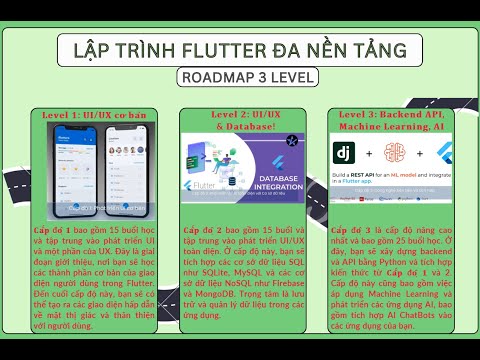
Trong video này, Thanh sẽ giới thiệu về khóa học Lập trình Flutter đa nền tảng Full Stack. Khóa học này sẽ giúp các bạn nắm vững kiến thức từ frontend đến backend, bao gồm cả việc tích hợp AI vào ứng dụng. Đây là cơ hội để các bạn trở thành một lập trình viên Full Stack chuyên nghiệp.


Nội dung khóa học

1. Level 1: UI/UX cơ bản

  • Thời lượng: 15 buổi.
  • Nội dung:
    • Học cách xây dựng giao diện người dùng (UI) cơ bản với Flutter.
    • Làm quen với ngôn ngữ Dart.
    • Tạo các giao diện hấp dẫn và thân thiện với người dùng.

2. Level 2: UI/UX nâng cao và Database

  • Thời lượng: 15 buổi.
  • Nội dung:
    • Xử lý toàn diện UI trên Flutter.
    • Tích hợp các loại cơ sở dữ liệu như SQL Server, MySQL, Firebase, và MongoDB.
    • Quản lý và lưu trữ dữ liệu trong ứng dụng.

3. Level 3: Backend, API và AI

  • Thời lượng: 25 buổi.
  • Nội dung:
    • Xây dựng backend bằng Python.
    • Tích hợp AI vào ứng dụng, bao gồm chatbot và các mô hình dự đoán (ví dụ: dự đoán doanh thu, giá cổ phiếu).
    • Học cách kết hợp kiến thức từ Level 1 và Level 2 để tạo ứng dụng hoàn chỉnh.

Demo tạo API cơ bản trên Python

1. Cài đặt công cụ

  • SQL Server: Cài đặt và cấu hình cơ sở dữ liệu.
  • Visual Studio Code: Công cụ lập trình chính.
  • Thư viện Flask: Cài đặt thư viện Flask để tạo API.

2. Tạo API đơn giản

  • Kết nối cơ sở dữ liệu: Sử dụng Flask để kết nối với SQL Server.
  • Tạo bảng và chèn dữ liệu: Tạo bảng user và chèn dữ liệu mẫu.
  • Chạy API: Sử dụng Postman để kiểm tra API.

3. Kết quả

  • API được tạo thành công và có thể thêm, lấy dữ liệu từ cơ sở dữ liệu.

Lời kết

Khóa học Lập trình Flutter đa nền tảng Full Stack sẽ giúp các bạn nắm vững kiến thức từ cơ bản đến nâng cao, từ frontend đến backend, và cả việc tích hợp AI vào ứng dụng. Hãy đăng ký khóa học để bắt đầu hành trình trở thành một lập trình viên Full Stack chuyên nghiệp.

👉 Xem video hướng dẫn chi tiết

Webinar 16.2: Phân tích định lượng, Backend API, xây dựng Bot cho giao dịch đầu tư tài chính

· 4 min read

Webinar 16.2: Phân tích định lượng, Backend API, xây dựng Bot cho giao dịch đầu tư tài chính

Video


Giới thiệu

Buổi webinar với chủ đề "Phân tích định lượng, Backend API, xây dựng Bot cho giao dịch đầu tư tài chính" đã diễn ra với nhiều nội dung hấp dẫn và thực tế. Tiến sĩ Đặng Anh Tuấn đã chia sẻ những kiến thức quý báu và kinh nghiệm thực tiễn trong lĩnh vực phân tích giao dịch định lượng.


Nội dung chính

1. Phân tích định lượng trong giao dịch tài chính

  • Quy trình phân tích:

    • Bước 1: Phân tích kỹ thuật.
    • Bước 2: Phân tích cơ bản.
    • Bước 3: Áp dụng các thuật toán học máy.
    • Bước 4: Giao dịch tự động (Bot trading).
  • Phân tích kỹ thuật:

    • Sử dụng các chỉ báo kỹ thuật như đường trung bình động (MA), RSI, MACD.
    • Dự báo giá dựa trên biểu đồ nến và các mô hình giá.
  • Phân tích cơ bản:

    • Đánh giá các yếu tố kinh tế vĩ mô, tình hình doanh nghiệp, và các yếu tố ảnh hưởng đến thị trường.
  • Thuật toán học máy:

    • Sử dụng các mô hình như mạng neuron nhân tạo (ANN), học sâu (Deep Learning), và học tăng cường (Reinforcement Learning).
    • Huấn luyện mô hình trên dữ liệu lịch sử để dự báo giá và tối ưu hóa chiến lược giao dịch.

2. Tích hợp Backend và API

  • Backend với Python:

    • Sử dụng Python để xây dựng backend, xử lý dữ liệu và cung cấp API.
    • Các thư viện phổ biến: Flask, FastAPI, Pandas, NumPy, Scikit-learn.
  • API trong giao dịch tự động:

    • API cho phép kết nối giữa ứng dụng giao dịch và sàn giao dịch.
    • Lấy dữ liệu thời gian thực (Real-time data) và thực hiện giao dịch tự động.
  • Demo tạo API đơn giản:

    • Tạo API bằng Flask để kết nối với cơ sở dữ liệu và trả về dữ liệu dạng JSON.
    • Sử dụng Postman để kiểm tra API.

3. Xây dựng Bot giao dịch tự động

  • Bot giao dịch:

    • Bot tự động thực hiện giao dịch dựa trên các tín hiệu từ phân tích kỹ thuật và học máy.
    • Tích hợp API để lấy dữ liệu thời gian thực và thực hiện lệnh giao dịch.
  • Chiến lược giao dịch:

    • Quét thị trường để tìm các mã cổ phiếu tiềm năng.
    • Đặt lệnh mua/bán dựa trên các điều kiện đã được lập trình sẵn.
  • Xử lý độ trễ:

    • Độ trễ trong giao dịch tự động có thể ảnh hưởng đến hiệu suất.
    • Giải pháp: Sử dụng các kỹ thuật như Slip (đợi vài giây giữa các lệnh) để tránh bị chặn bởi sàn giao dịch.

4. Thách thức và giải pháp

  • Thách thức:

    • Dữ liệu thời gian thực không phải lúc nào cũng chính xác.
    • Rủi ro từ các yếu tố bên ngoài như biến động chính trị, kinh tế.
    • Độ trễ trong giao dịch tự động.
  • Giải pháp:

    • Sử dụng các thuật toán học máy để cải thiện độ chính xác của dự báo.
    • Tối ưu hóa chiến lược giao dịch để giảm thiểu rủi ro.
    • Sử dụng các nguồn dữ liệu đáng tin cậy và cập nhật thường xuyên.

Kết luận

  • Phân tích định lượnggiao dịch tự động là những công cụ mạnh mẽ giúp nhà đầu tư tối ưu hóa chiến lược và giảm thiểu rủi ro.
  • Backend và API đóng vai trò quan trọng trong việc kết nối và xử lý dữ liệu thời gian thực.
  • Bot giao dịch tự động giúp tăng hiệu suất và giảm thiểu sai sót trong quá trình giao dịch.

Tài liệu tham khảo

Webinar: Lập trình Flutter tích hợp Backend và API

· 3 min read

Webinar: Lập trình Flutter tích hợp Backend và API

Video


Giới thiệu

Buổi webinar với chủ đề "Lập trình Flutter tích hợp Backend và API" đã diễn ra với nhiều nội dung hấp dẫn và thực tế. Flutter là một framework phát triển ứng dụng di động đa nền tảng, được đánh giá cao về khả năng tạo giao diện đẹp và mượt mà. Backend và API là hai thành phần quan trọng trong việc xử lý dữ liệu và logic nghiệp vụ phía server.


Nội dung chính

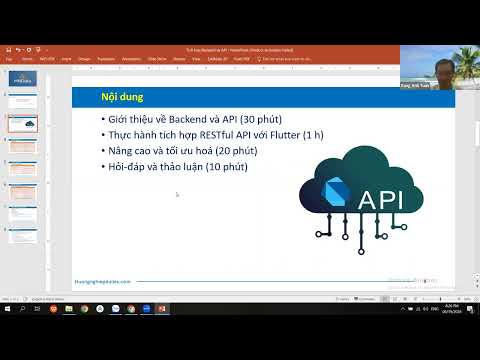
1. Khái niệm Backend và API

  • Backend: Phần phía server của ứng dụng, bao gồm máy chủ, cơ sở dữ liệu và các ứng dụng xử lý logic nghiệp vụ.
    • Chức năng chính:
      • Quản lý dữ liệu.
      • Xử lý logic nghiệp vụ.
      • Xác thực và phân quyền.
      • Giao tiếp với frontend thông qua API.
  • API: Giao diện lập trình ứng dụng (Application Programming Interface), là tập hợp các quy tắc và giao thức cho phép các ứng dụng giao tiếp với nhau.
    • Vai trò:
      • Kết nối hệ thống.
      • Truy cập dịch vụ.
      • Trực quan hóa dữ liệu.

2. Tích hợp Backend và API với Flutter

  • Python làm Backend: Python được sử dụng để xây dựng backend, xử lý dữ liệu và cung cấp API.
  • Flutter làm Frontend: Flutter được sử dụng để xây dựng giao diện người dùng và kết nối với backend thông qua API.
  • Demo thực tế:
    • Tạo API đơn giản bằng Python.
    • Kết nối API với ứng dụng Flutter.
    • Hiển thị dữ liệu từ API lên giao diện Flutter.

3. Thực hành và Demo

  • Tạo API đơn giản:
    • Sử dụng Python và thư viện Flask để tạo API.
    • API trả về dữ liệu dạng JSON.
  • Kết nối API với Flutter:
    • Sử dụng package http trong Flutter để gọi API.
    • Hiển thị dữ liệu từ API lên giao diện Flutter.
  • Demo ứng dụng thực tế:
    • Ứng dụng hiển thị dữ liệu chứng khoán từ API.
    • Ứng dụng dự báo giá cổ phiếu sử dụng mô hình học máy.

4. Lợi ích của việc tích hợp Backend và API với Flutter

  • Hiệu suất cao: Flutter có khả năng hiển thị giao diện mượt mà và nhanh chóng.
  • Dễ dàng tích hợp: API giúp kết nối dễ dàng giữa frontend và backend.
  • Linh hoạt: Có thể sử dụng nhiều ngôn ngữ lập trình để xây dựng backend (Python, Node.js, Java, ...).

Kết luận

  • Flutter là một công cụ mạnh mẽ để phát triển ứng dụng di động đa nền tảng.
  • Backend và API đóng vai trò quan trọng trong việc xử lý dữ liệu và logic nghiệp vụ.
  • Python là một lựa chọn tốt để xây dựng backend và cung cấp API cho ứng dụng Flutter.

Tài liệu tham khảo

Giới Thiệu Thư Viện Dio và Lý Do Nên Dùng Thay HTTP trong Flutter

· 8 min read

Khi phát triển ứng dụng Flutter, việc gọi API là một phần không thể thiếu. Trong khi package http là lựa chọn cơ bản, Dio là một giải pháp mạnh mẽ và linh hoạt hơn nhiều. Bài viết này sẽ giới thiệu về Dio và giải thích tại sao bạn nên sử dụng nó thay vì http package.


1️⃣ Dio Là Gì?

Dio là một HTTP client mạnh mẽ cho Dart/Flutter, được phát triển bởi Flutter China. Dio cung cấp nhiều tính năng nâng cao mà package http cơ bản không có.

1.1 Cài Đặt Dio

Thêm Dio vào file pubspec.yaml:

dependencies:
dio: ^5.4.0

Sau đó chạy:

flutter pub get

1.2 Import Dio

import 'package:dio/dio.dart';

2️⃣ So Sánh Dio vs HTTP Package

2.1 HTTP Package - Giải Pháp Cơ Bản

import 'package:http/http.dart' as http;
import 'dart:convert';

// Gọi API với http package
Future<void> fetchData() async {
final response = await http.get(
Uri.parse('https://api.example.com/data'),
headers: {'Content-Type': 'application/json'},
);

if (response.statusCode == 200) {
final data = json.decode(response.body);
print(data);
} else {
print('Error: ${response.statusCode}');
}
}

Hạn chế của HTTP package:

  • ❌ Không có interceptors
  • ❌ Không hỗ trợ retry tự động
  • ❌ Không có request/response transformers
  • ❌ Xử lý lỗi thủ công
  • ❌ Không có timeout configuration dễ dàng
  • ❌ Không hỗ trợ cancel requests

2.2 Dio - Giải Pháp Mạnh Mẽ

import 'package:dio/dio.dart';

// Gọi API với Dio
Future<void> fetchData() async {
final dio = Dio();

try {
final response = await dio.get('https://api.example.com/data');
print(response.data);
} catch (e) {
print('Error: $e');
}
}

Ưu điểm của Dio:

  • ✅ Interceptors mạnh mẽ
  • ✅ Retry logic tự động
  • ✅ Request/Response transformers
  • ✅ Xử lý lỗi tốt hơn
  • ✅ Timeout configuration dễ dàng
  • ✅ Hỗ trợ cancel requests
  • ✅ Hỗ trợ file upload/download
  • ✅ Progress callbacks

3️⃣ Các Tính Năng Nổi Bật Của Dio

3.1 Interceptors

Dio cho phép bạn thêm interceptors để xử lý requests và responses trước/sau khi gửi/nhận:

final dio = Dio();

// Thêm interceptor để log requests
dio.interceptors.add(LogInterceptor(
requestBody: true,
responseBody: true,
));

// Thêm interceptor tùy chỉnh
dio.interceptors.add(InterceptorsWrapper(
onRequest: (options, handler) {
// Thêm token vào header
options.headers['Authorization'] = 'Bearer your_token';
return handler.next(options);
},
onResponse: (response, handler) {
// Xử lý response
return handler.next(response);
},
onError: (error, handler) {
// Xử lý lỗi
return handler.next(error);
},
));

3.2 Retry Logic

Dio hỗ trợ retry tự động khi request thất bại:

import 'package:dio/retry.dart';

final dio = Dio();

dio.interceptors.add(
RetryInterceptor(
dio: dio,
options: const RetryOptions(
retries: 3,
retryInterval: Duration(seconds: 2),
),
),
);

3.3 Request/Response Transformers

Transform dữ liệu trước khi gửi/nhận:

final dio = Dio();

dio.transformer = BackgroundTransformer()..jsonDecodeCallback = parseJson;

// Custom JSON parser
Map<String, dynamic> parseJson(String text) {
// Custom parsing logic
return jsonDecode(text);
}

3.4 Timeout Configuration

Cấu hình timeout dễ dàng:

final dio = Dio(BaseOptions(
connectTimeout: Duration(seconds: 5),
receiveTimeout: Duration(seconds: 3),
sendTimeout: Duration(seconds: 3),
));

3.5 Cancel Requests

Hủy request khi không cần thiết:

final cancelToken = CancelToken();

// Gọi API với cancel token
dio.get(
'https://api.example.com/data',
cancelToken: cancelToken,
);

// Hủy request
cancelToken.cancel('Request cancelled');

3.6 File Upload/Download

Dio hỗ trợ upload và download file với progress callback:

// Upload file
FormData formData = FormData.fromMap({
'file': await MultipartFile.fromFile('/path/to/file'),
});

await dio.post(
'https://api.example.com/upload',
data: formData,
onSendProgress: (sent, total) {
print('Progress: ${(sent / total * 100).toStringAsFixed(0)}%');
},
);

// Download file
await dio.download(
'https://api.example.com/file',
'/path/to/save/file',
onReceiveProgress: (received, total) {
print('Progress: ${(received / total * 100).toStringAsFixed(0)}%');
},
);

4️⃣ Lý Do Nên Dùng Dio Thay HTTP

4.1 Code Sạch Hơn và Dễ Bảo Trì

Với HTTP package:

Future<Map<String, dynamic>> fetchUser(int userId) async {
final uri = Uri.parse('https://api.example.com/users/$userId');
final response = await http.get(
uri,
headers: {
'Content-Type': 'application/json',
'Authorization': 'Bearer $token',
},
);

if (response.statusCode == 200) {
return json.decode(response.body);
} else if (response.statusCode == 401) {
throw UnauthorizedException();
} else if (response.statusCode == 404) {
throw NotFoundException();
} else {
throw ServerException();
}
}

Với Dio:

Future<Map<String, dynamic>> fetchUser(int userId) async {
try {
final response = await dio.get('/users/$userId');
return response.data;
} on DioException catch (e) {
if (e.response?.statusCode == 401) {
throw UnauthorizedException();
} else if (e.response?.statusCode == 404) {
throw NotFoundException();
} else {
throw ServerException();
}
}
}

4.2 Xử Lý Lỗi Tốt Hơn

Dio cung cấp DioException với nhiều thông tin hữu ích:

try {
await dio.get('/api/data');
} on DioException catch (e) {
switch (e.type) {
case DioExceptionType.connectionTimeout:
print('Connection timeout');
break;
case DioExceptionType.sendTimeout:
print('Send timeout');
break;
case DioExceptionType.receiveTimeout:
print('Receive timeout');
break;
case DioExceptionType.badResponse:
print('Bad response: ${e.response?.statusCode}');
break;
case DioExceptionType.cancel:
print('Request cancelled');
break;
default:
print('Other error: ${e.message}');
}
}

4.3 Interceptors Cho Toàn Bộ App

Với Dio, bạn có thể cấu hình interceptors một lần và áp dụng cho tất cả requests:

class ApiClient {
static final Dio _dio = Dio(BaseOptions(
baseUrl: 'https://api.example.com',
headers: {'Content-Type': 'application/json'},
));

static void init() {
// Thêm token vào mọi request
_dio.interceptors.add(InterceptorsWrapper(
onRequest: (options, handler) {
final token = TokenManager.getToken();
if (token != null) {
options.headers['Authorization'] = 'Bearer $token';
}
return handler.next(options);
},
));

// Log requests
_dio.interceptors.add(LogInterceptor(
requestBody: true,
responseBody: true,
));

// Retry logic
_dio.interceptors.add(
RetryInterceptor(
dio: _dio,
options: const RetryOptions(retries: 3),
),
);
}

static Dio get dio => _dio;
}

4.4 Type Safety Tốt Hơn

Dio hỗ trợ generic types cho responses:

// Định nghĩa model
class User {
final int id;
final String name;
final String email;

User({required this.id, required this.name, required this.email});

factory User.fromJson(Map<String, dynamic> json) {
return User(
id: json['id'],
name: json['name'],
email: json['email'],
);
}
}

// Sử dụng với Dio
Future<User> fetchUser(int id) async {
final response = await dio.get<Map<String, dynamic>>('/users/$id');
return User.fromJson(response.data!);
}

4.5 Hỗ Trợ Nhiều Format Dữ Liệu

Dio tự động xử lý JSON, FormData, và các format khác:

// JSON (mặc định)
await dio.post('/api/data', data: {'key': 'value'});

// FormData
await dio.post('/api/upload', data: FormData.fromMap({
'file': multipartFile,
'name': 'filename',
}));

// URL encoded
await dio.post(
'/api/data',
data: {'key': 'value'},
options: Options(contentType: Headers.formUrlEncodedContentType),
);

5️⃣ Ví Dụ Thực Tế: Tạo API Client Với Dio

import 'package:dio/dio.dart';

class ApiService {
late Dio _dio;

ApiService() {
_dio = Dio(BaseOptions(
baseUrl: 'https://api.example.com',
connectTimeout: Duration(seconds: 5),
receiveTimeout: Duration(seconds: 3),
headers: {
'Content-Type': 'application/json',
},
));

_setupInterceptors();
}

void _setupInterceptors() {
// Log interceptor
_dio.interceptors.add(LogInterceptor(
requestBody: true,
responseBody: true,
error: true,
));

// Auth interceptor
_dio.interceptors.add(InterceptorsWrapper(
onRequest: (options, handler) {
final token = _getToken();
if (token != null) {
options.headers['Authorization'] = 'Bearer $token';
}
return handler.next(options);
},
onError: (error, handler) {
if (error.response?.statusCode == 401) {
// Refresh token hoặc đăng nhập lại
_handleUnauthorized();
}
return handler.next(error);
},
));
}

String? _getToken() {
// Lấy token từ storage
return 'your_token_here';
}

void _handleUnauthorized() {
// Xử lý khi unauthorized
}

// GET request
Future<Response> get(String path, {Map<String, dynamic>? queryParameters}) async {
try {
return await _dio.get(path, queryParameters: queryParameters);
} on DioException catch (e) {
throw _handleError(e);
}
}

// POST request
Future<Response> post(String path, {dynamic data}) async {
try {
return await _dio.post(path, data: data);
} on DioException catch (e) {
throw _handleError(e);
}
}

// PUT request
Future<Response> put(String path, {dynamic data}) async {
try {
return await _dio.put(path, data: data);
} on DioException catch (e) {
throw _handleError(e);
}
}

// DELETE request
Future<Response> delete(String path) async {
try {
return await _dio.delete(path);
} on DioException catch (e) {
throw _handleError(e);
}
}

Exception _handleError(DioException error) {
switch (error.type) {
case DioExceptionType.connectionTimeout:
case DioExceptionType.sendTimeout:
case DioExceptionType.receiveTimeout:
return TimeoutException('Request timeout');
case DioExceptionType.badResponse:
return ServerException('Server error: ${error.response?.statusCode}');
case DioExceptionType.cancel:
return CancelException('Request cancelled');
default:
return NetworkException('Network error: ${error.message}');
}
}
}

// Custom exceptions
class TimeoutException implements Exception {
final String message;
TimeoutException(this.message);
}

class ServerException implements Exception {
final String message;
ServerException(this.message);
}

class CancelException implements Exception {
final String message;
CancelException(this.message);
}

class NetworkException implements Exception {
final String message;
NetworkException(this.message);
}

6️⃣ Kết Luận

Dio là lựa chọn tốt hơn so với HTTP package vì:

Tính năng phong phú: Interceptors, retry, transformers
Code sạch hơn: Dễ đọc, dễ bảo trì
Xử lý lỗi tốt hơn: DioException với nhiều thông tin
Linh hoạt: Hỗ trợ nhiều use cases
Cộng đồng lớn: Nhiều tài liệu và ví dụ
Được maintain tích cực: Cập nhật thường xuyên

💡 Lời khuyên: Nếu bạn đang bắt đầu dự án Flutter mới, hãy sử dụng Dio ngay từ đầu. Nếu đang dùng HTTP package, việc migrate sang Dio cũng không quá khó khăn và sẽ mang lại nhiều lợi ích.


🎓 Học Sâu Hơn Về Flutter

Muốn master Flutter, API Integration, và các best practices? Tham gia các khóa học tại Hướng Nghiệp Dữ Liệu:

📚 Khóa Học Liên Quan:


📝 Bài viết này được biên soạn bởi đội ngũ Hướng Nghiệp Dữ Liệu. Để cập nhật thêm về Flutter, Dio và các best practices trong phát triển ứng dụng di động, hãy theo dõi blog của chúng tôi.

Hướng Dẫn Call API Bằng Dio Có Kèm Interceptor và Retry Logic

· 9 min read

Trong bài viết này, chúng ta sẽ học cách sử dụng Dio để gọi API trong Flutter với các tính năng nâng cao như interceptors và retry logic. Đây là những kỹ thuật quan trọng để xây dựng ứng dụng Flutter chuyên nghiệp.


1️⃣ Cài Đặt và Cấu Hình Cơ Bản

1.1 Cài Đặt Dio

Thêm vào pubspec.yaml:

dependencies:
dio: ^5.4.0
dio_retry: ^2.0.0 # Cho retry logic

1.2 Tạo Dio Instance

import 'package:dio/dio.dart';

class ApiClient {
late Dio _dio;

ApiClient() {
_dio = Dio(BaseOptions(
baseUrl: 'https://api.example.com',
connectTimeout: Duration(seconds: 5),
receiveTimeout: Duration(seconds: 3),
sendTimeout: Duration(seconds: 3),
headers: {
'Content-Type': 'application/json',
'Accept': 'application/json',
},
));
}

Dio get dio => _dio;
}

2️⃣ Interceptors - Xử Lý Requests và Responses

2.1 Log Interceptor

Ghi log tất cả requests và responses:

import 'package:dio/dio.dart';

void setupLogInterceptor(Dio dio) {
dio.interceptors.add(LogInterceptor(
request: true,
requestHeader: true,
requestBody: true,
responseHeader: true,
responseBody: true,
error: true,
logPrint: (obj) {
// Sử dụng logger của bạn (ví dụ: logger package)
print(obj);
},
));
}

2.2 Authentication Interceptor

Tự động thêm token vào mọi request:

class AuthInterceptor extends Interceptor {
@override
void onRequest(RequestOptions options, RequestInterceptorHandler handler) {
// Lấy token từ storage
final token = TokenStorage.getToken();

if (token != null) {
options.headers['Authorization'] = 'Bearer $token';
}

handler.next(options);
}
}

// Sử dụng
dio.interceptors.add(AuthInterceptor());

2.3 Refresh Token Interceptor

Tự động refresh token khi hết hạn:

class RefreshTokenInterceptor extends Interceptor {
final Dio refreshDio;

RefreshTokenInterceptor(this.refreshDio);

@override
void onError(DioException err, ErrorInterceptorHandler handler) async {
// Nếu lỗi 401 (Unauthorized)
if (err.response?.statusCode == 401) {
try {
// Refresh token
final newToken = await _refreshToken();

if (newToken != null) {
// Lưu token mới
TokenStorage.saveToken(newToken);

// Retry request với token mới
final opts = err.requestOptions;
opts.headers['Authorization'] = 'Bearer $newToken';

final response = await refreshDio.request(
opts.path,
options: Options(
method: opts.method,
headers: opts.headers,
),
data: opts.data,
queryParameters: opts.queryParameters,
);

return handler.resolve(response);
}
} catch (e) {
// Nếu refresh token thất bại, đăng xuất
await AuthService.logout();
return handler.reject(err);
}
}

return handler.next(err);
}

Future<String?> _refreshToken() async {
try {
final refreshToken = TokenStorage.getRefreshToken();
final response = await refreshDio.post(
'/auth/refresh',
data: {'refresh_token': refreshToken},
);

return response.data['access_token'];
} catch (e) {
return null;
}
}
}

// Sử dụng
final refreshDio = Dio();
dio.interceptors.add(RefreshTokenInterceptor(refreshDio));

2.4 Error Handling Interceptor

Xử lý lỗi tập trung:

class ErrorInterceptor extends Interceptor {
@override
void onError(DioException err, ErrorInterceptorHandler handler) {
String errorMessage = 'Đã xảy ra lỗi';

switch (err.type) {
case DioExceptionType.connectionTimeout:
case DioExceptionType.sendTimeout:
case DioExceptionType.receiveTimeout:
errorMessage = 'Kết nối timeout. Vui lòng thử lại.';
break;
case DioExceptionType.badResponse:
final statusCode = err.response?.statusCode;
switch (statusCode) {
case 400:
errorMessage = 'Yêu cầu không hợp lệ';
break;
case 401:
errorMessage = 'Chưa đăng nhập hoặc token đã hết hạn';
break;
case 403:
errorMessage = 'Không có quyền truy cập';
break;
case 404:
errorMessage = 'Không tìm thấy tài nguyên';
break;
case 500:
errorMessage = 'Lỗi server. Vui lòng thử lại sau.';
break;
default:
errorMessage = 'Lỗi server: $statusCode';
}
break;
case DioExceptionType.cancel:
errorMessage = 'Request đã bị hủy';
break;
case DioExceptionType.unknown:
errorMessage = 'Không có kết nối internet';
break;
default:
errorMessage = err.message ?? 'Đã xảy ra lỗi';
}

// Hiển thị thông báo lỗi (sử dụng snackbar, dialog, etc.)
ErrorHandler.showError(errorMessage);

handler.next(err);
}
}

// Sử dụng
dio.interceptors.add(ErrorInterceptor());

2.5 Request/Response Transformer Interceptor

Transform dữ liệu trước khi gửi/nhận:

class DataTransformerInterceptor extends Interceptor {
@override
void onRequest(RequestOptions options, RequestInterceptorHandler handler) {
// Transform request data
if (options.data is Map) {
// Thêm timestamp, device info, etc.
options.data = {
...options.data as Map,
'timestamp': DateTime.now().toIso8601String(),
'device_id': DeviceInfo.getDeviceId(),
};
}

handler.next(options);
}

@override
void onResponse(Response response, ResponseInterceptorHandler handler) {
// Transform response data
if (response.data is Map) {
final data = response.data as Map;

// Unwrap nested data nếu cần
if (data.containsKey('data')) {
response.data = data['data'];
}
}

handler.next(response);
}
}

// Sử dụng
dio.interceptors.add(DataTransformerInterceptor());

3️⃣ Retry Logic - Tự Động Thử Lại Khi Thất Bại

3.1 Sử dụng dio_retry Package

import 'package:dio/dio.dart';
import 'package:dio_retry/dio_retry.dart';

void setupRetryInterceptor(Dio dio) {
dio.interceptors.add(
RetryInterceptor(
dio: dio,
options: RetryOptions(
retries: 3, // Số lần retry
retryInterval: Duration(seconds: 2), // Khoảng thời gian giữa các lần retry
exponentialBackoff: true, // Tăng dần thời gian chờ
retryableExtraStatuses: [401, 403], // Retry với các status code này
),
),
);
}

3.2 Custom Retry Logic

Tự xây dựng retry logic:

class RetryInterceptor extends Interceptor {
final int maxRetries;
final Duration retryDelay;

RetryInterceptor({
this.maxRetries = 3,
this.retryDelay = const Duration(seconds: 2),
});

@override
void onError(DioException err, ErrorInterceptorHandler handler) async {
if (_shouldRetry(err)) {
final retryCount = err.requestOptions.extra['retryCount'] ?? 0;

if (retryCount < maxRetries) {
// Tăng retry count
err.requestOptions.extra['retryCount'] = retryCount + 1;

// Đợi trước khi retry
await Future.delayed(retryDelay * (retryCount + 1));

try {
// Retry request
final response = await dio.request(
err.requestOptions.path,
options: Options(
method: err.requestOptions.method,
headers: err.requestOptions.headers,
),
data: err.requestOptions.data,
queryParameters: err.requestOptions.queryParameters,
extra: err.requestOptions.extra,
);

return handler.resolve(response);
} catch (e) {
// Nếu vẫn lỗi, tiếp tục retry hoặc reject
if (retryCount + 1 < maxRetries) {
return onError(err, handler);
}
}
}
}

handler.next(err);
}

bool _shouldRetry(DioException err) {
// Chỉ retry với một số loại lỗi nhất định
return err.type == DioExceptionType.connectionTimeout ||
err.type == DioExceptionType.receiveTimeout ||
err.type == DioExceptionType.sendTimeout ||
(err.response?.statusCode != null &&
err.response!.statusCode! >= 500);
}
}

// Sử dụng
dio.interceptors.add(RetryInterceptor(maxRetries: 3));

4️⃣ Ví Dụ Hoàn Chỉnh: API Service Với Interceptors và Retry

import 'package:dio/dio.dart';
import 'package:dio_retry/dio_retry.dart';

class ApiService {
late Dio _dio;
static final ApiService _instance = ApiService._internal();

factory ApiService() => _instance;

ApiService._internal() {
_dio = Dio(BaseOptions(
baseUrl: 'https://api.example.com',
connectTimeout: Duration(seconds: 5),
receiveTimeout: Duration(seconds: 3),
sendTimeout: Duration(seconds: 3),
headers: {
'Content-Type': 'application/json',
'Accept': 'application/json',
},
));

_setupInterceptors();
}

void _setupInterceptors() {
// 1. Log Interceptor
_dio.interceptors.add(LogInterceptor(
requestBody: true,
responseBody: true,
error: true,
));

// 2. Auth Interceptor
_dio.interceptors.add(InterceptorsWrapper(
onRequest: (options, handler) {
final token = _getToken();
if (token != null) {
options.headers['Authorization'] = 'Bearer $token';
}
return handler.next(options);
},
));

// 3. Retry Interceptor
_dio.interceptors.add(
RetryInterceptor(
dio: _dio,
options: RetryOptions(
retries: 3,
retryInterval: Duration(seconds: 2),
exponentialBackoff: true,
),
),
);

// 4. Error Interceptor
_dio.interceptors.add(InterceptorsWrapper(
onError: (error, handler) {
_handleError(error);
return handler.next(error);
},
));
}

String? _getToken() {
// Lấy token từ secure storage
// return SecureStorage.getToken();
return null;
}

void _handleError(DioException error) {
// Xử lý lỗi tập trung
// Có thể hiển thị snackbar, log, etc.
print('API Error: ${error.message}');
}

// GET request
Future<Response<T>> get<T>(
String path, {
Map<String, dynamic>? queryParameters,
Options? options,
CancelToken? cancelToken,
}) async {
try {
return await _dio.get<T>(
path,
queryParameters: queryParameters,
options: options,
cancelToken: cancelToken,
);
} on DioException catch (e) {
throw _mapException(e);
}
}

// POST request
Future<Response<T>> post<T>(
String path, {
dynamic data,
Map<String, dynamic>? queryParameters,
Options? options,
CancelToken? cancelToken,
}) async {
try {
return await _dio.post<T>(
path,
data: data,
queryParameters: queryParameters,
options: options,
cancelToken: cancelToken,
);
} on DioException catch (e) {
throw _mapException(e);
}
}

// PUT request
Future<Response<T>> put<T>(
String path, {
dynamic data,
Map<String, dynamic>? queryParameters,
Options? options,
CancelToken? cancelToken,
}) async {
try {
return await _dio.put<T>(
path,
data: data,
queryParameters: queryParameters,
options: options,
cancelToken: cancelToken,
);
} on DioException catch (e) {
throw _mapException(e);
}
}

// DELETE request
Future<Response<T>> delete<T>(
String path, {
dynamic data,
Map<String, dynamic>? queryParameters,
Options? options,
CancelToken? cancelToken,
}) async {
try {
return await _dio.delete<T>(
path,
data: data,
queryParameters: queryParameters,
options: options,
cancelToken: cancelToken,
);
} on DioException catch (e) {
throw _mapException(e);
}
}

Exception _mapException(DioException error) {
switch (error.type) {
case DioExceptionType.connectionTimeout:
case DioExceptionType.sendTimeout:
case DioExceptionType.receiveTimeout:
return TimeoutException('Request timeout');
case DioExceptionType.badResponse:
return ServerException(
'Server error: ${error.response?.statusCode}',
error.response?.statusCode,
);
case DioExceptionType.cancel:
return CancelException('Request cancelled');
default:
return NetworkException('Network error: ${error.message}');
}
}
}

// Custom exceptions
class TimeoutException implements Exception {
final String message;
TimeoutException(this.message);
}

class ServerException implements Exception {
final String message;
final int? statusCode;
ServerException(this.message, this.statusCode);
}

class CancelException implements Exception {
final String message;
CancelException(this.message);
}

class NetworkException implements Exception {
final String message;
NetworkException(this.message);
}

5️⃣ Sử Dụng API Service

// Trong repository hoặc service
class UserRepository {
final ApiService _apiService = ApiService();

Future<User> getUser(int id) async {
try {
final response = await _apiService.get<Map<String, dynamic>>('/users/$id');
return User.fromJson(response.data!);
} catch (e) {
throw Exception('Failed to get user: $e');
}
}

Future<List<User>> getUsers() async {
try {
final response = await _apiService.get<List<dynamic>>('/users');
return (response.data as List)
.map((json) => User.fromJson(json))
.toList();
} catch (e) {
throw Exception('Failed to get users: $e');
}
}

Future<User> createUser(User user) async {
try {
final response = await _apiService.post<Map<String, dynamic>>(
'/users',
data: user.toJson(),
);
return User.fromJson(response.data!);
} catch (e) {
throw Exception('Failed to create user: $e');
}
}
}

6️⃣ Best Practices

6.1 Thứ Tự Interceptors

Thứ tự interceptors quan trọng:

// 1. Log interceptor (đầu tiên để log tất cả)
dio.interceptors.add(LogInterceptor());

// 2. Auth interceptor (thêm token)
dio.interceptors.add(AuthInterceptor());

// 3. Retry interceptor (retry khi lỗi)
dio.interceptors.add(RetryInterceptor());

// 4. Error interceptor (xử lý lỗi cuối cùng)
dio.interceptors.add(ErrorInterceptor());

6.2 Sử Dụng Singleton Pattern

Tạo một instance Dio duy nhất cho toàn bộ app:

class ApiService {
static final ApiService _instance = ApiService._internal();
factory ApiService() => _instance;
ApiService._internal();
}

6.3 Cancel Token Cho Long-Running Requests

final cancelToken = CancelToken();

// Gọi API
_apiService.get('/data', cancelToken: cancelToken);

// Hủy khi không cần thiết (ví dụ: khi widget dispose)
@override
void dispose() {
cancelToken.cancel('Widget disposed');
super.dispose();
}

7️⃣ Kết Luận

Với Dio, interceptors và retry logic, bạn có thể:

Tự động thêm authentication vào mọi request
Xử lý lỗi tập trung và nhất quán
Tự động retry khi request thất bại
Log requests/responses để debug
Transform data trước khi gửi/nhận

💡 Lời khuyên: Sử dụng interceptors để tách biệt concerns. Mỗi interceptor nên có một nhiệm vụ cụ thể. Điều này giúp code dễ đọc, dễ test và dễ bảo trì.


🎓 Học Sâu Hơn Về Flutter

Muốn master Flutter, API Integration, và các best practices? Tham gia các khóa học tại Hướng Nghiệp Dữ Liệu:

📚 Khóa Học Liên Quan:


📝 Bài viết này được biên soạn bởi đội ngũ Hướng Nghiệp Dữ Liệu. Để cập nhật thêm về Flutter, Dio và các best practices trong phát triển ứng dụng di động, hãy theo dõi blog của chúng tôi.

Hướng Dẫn Sử Dụng Riverpod/Provider Cho Quản Lý State Khi Gọi API

· 10 min read

Quản lý state khi gọi API là một thách thức trong Flutter. Bài viết này sẽ hướng dẫn bạn cách sử dụng Riverpod hoặc Provider để quản lý state một cách hiệu quả khi gọi API.


1️⃣ Tại Sao Cần State Management Cho API?

1.1 Vấn Đề Khi Không Dùng State Management

// ❌ Không tốt: State management thủ công
class UserScreen extends StatefulWidget {
@override
_UserScreenState createState() => _UserScreenState();
}

class _UserScreenState extends State<UserScreen> {
User? user;
bool isLoading = false;
String? error;

@override
void initState() {
super.initState();
_loadUser();
}

Future<void> _loadUser() async {
setState(() => isLoading = true);
try {
final response = await api.getUser(1);
setState(() {
user = response;
isLoading = false;
});
} catch (e) {
setState(() {
error = e.toString();
isLoading = false;
});
}
}

@override
Widget build(BuildContext context) {
// Phải xử lý loading, error, data trong mọi widget
if (isLoading) return CircularProgressIndicator();
if (error != null) return Text('Error: $error');
if (user == null) return Text('No data');
return UserWidget(user: user!);
}
}

Vấn đề:

  • ❌ Code lặp lại nhiều
  • ❌ Khó test
  • ❌ Khó share state giữa các widget
  • ❌ Không có caching

1.2 Giải Pháp: State Management

Với Riverpod/Provider:

  • ✅ Code sạch hơn
  • ✅ Dễ test
  • ✅ Share state dễ dàng
  • ✅ Có caching
  • ✅ Auto dispose

2️⃣ Sử Dụng Riverpod

2.1 Cài Đặt

dependencies:
flutter_riverpod: ^2.4.9
riverpod_annotation: ^2.3.3

dev_dependencies:
build_runner: ^2.4.7
riverpod_generator: ^2.3.9

2.2 Tạo API Provider

import 'package:flutter_riverpod/flutter_riverpod.dart';
import 'package:dio/dio.dart';

// API Service
final apiServiceProvider = Provider<Dio>((ref) {
return Dio(BaseOptions(
baseUrl: 'https://api.example.com',
));
});

// User Repository
final userRepositoryProvider = Provider<UserRepository>((ref) {
final dio = ref.watch(apiServiceProvider);
return UserRepository(dio);
});

2.3 Tạo Async State Provider

import 'package:flutter_riverpod/flutter_riverpod.dart';

// User Provider với async state
final userProvider = FutureProvider.family<User, int>((ref, userId) async {
final repository = ref.watch(userRepositoryProvider);
return await repository.getUser(userId);
});

// Users List Provider
final usersProvider = FutureProvider<List<User>>((ref) async {
final repository = ref.watch(userRepositoryProvider);
return await repository.getUsers();
});

2.4 Sử Dụng Trong Widget

import 'package:flutter_riverpod/flutter_riverpod.dart';

class UserScreen extends ConsumerWidget {
final int userId;

const UserScreen({Key? key, required this.userId}) : super(key: key);

@override
Widget build(BuildContext context, WidgetRef ref) {
final userAsync = ref.watch(userProvider(userId));

return Scaffold(
appBar: AppBar(title: Text('User')),
body: userAsync.when(
data: (user) => UserDetailsWidget(user: user),
loading: () => Center(child: CircularProgressIndicator()),
error: (error, stack) => ErrorWidget(
error: error,
onRetry: () => ref.refresh(userProvider(userId)),
),
),
);
}
}

3️⃣ StateNotifier Cho Complex State

3.1 Tạo State Class

// User State
class UserState {
final User? user;
final bool isLoading;
final String? error;

UserState({
this.user,
this.isLoading = false,
this.error,
});

UserState copyWith({
User? user,
bool? isLoading,
String? error,
}) {
return UserState(
user: user ?? this.user,
isLoading: isLoading ?? this.isLoading,
error: error,
);
}
}

3.2 Tạo StateNotifier

import 'package:flutter_riverpod/flutter_riverpod.dart';

class UserNotifier extends StateNotifier<UserState> {
final UserRepository repository;

UserNotifier(this.repository) : super(UserState());

Future<void> loadUser(int userId) async {
state = state.copyWith(isLoading: true, error: null);

try {
final user = await repository.getUser(userId);
state = state.copyWith(user: user, isLoading: false);
} catch (e) {
state = state.copyWith(
error: e.toString(),
isLoading: false,
);
}
}

Future<void> updateUser(User user) async {
state = state.copyWith(isLoading: true, error: null);

try {
final updatedUser = await repository.updateUser(user);
state = state.copyWith(user: updatedUser, isLoading: false);
} catch (e) {
state = state.copyWith(
error: e.toString(),
isLoading: false,
);
}
}

void clearError() {
state = state.copyWith(error: null);
}
}

// Provider
final userNotifierProvider = StateNotifierProvider<UserNotifier, UserState>((ref) {
final repository = ref.watch(userRepositoryProvider);
return UserNotifier(repository);
});

3.3 Sử Dụng StateNotifier

class UserScreen extends ConsumerWidget {
final int userId;

const UserScreen({Key? key, required this.userId}) : super(key: key);

@override
Widget build(BuildContext context, WidgetRef ref) {
final userState = ref.watch(userNotifierProvider);

// Load user khi widget được build
ref.listen(userNotifierProvider.notifier, (previous, next) {
next.loadUser(userId);
});

if (userState.isLoading) {
return Scaffold(
body: Center(child: CircularProgressIndicator()),
);
}

if (userState.error != null) {
return Scaffold(
body: ErrorWidget(
error: userState.error!,
onRetry: () => ref.read(userNotifierProvider.notifier).loadUser(userId),
),
);
}

if (userState.user == null) {
return Scaffold(
body: Center(child: Text('No data')),
);
}

return Scaffold(
appBar: AppBar(title: Text('User')),
body: UserDetailsWidget(user: userState.user!),
);
}
}

4️⃣ AsyncNotifier (Riverpod 2.0+)

4.1 Tạo AsyncNotifier

import 'package:flutter_riverpod/flutter_riverpod.dart';

class UserAsyncNotifier extends AsyncNotifier<User> {
@override
Future<User> build() async {
// Load initial data
final userId = ref.watch(selectedUserIdProvider);
final repository = ref.watch(userRepositoryProvider);
return await repository.getUser(userId);
}

Future<void> refresh() async {
state = const AsyncValue.loading();
state = await AsyncValue.guard(() async {
final userId = ref.read(selectedUserIdProvider);
final repository = ref.read(userRepositoryProvider);
return await repository.getUser(userId);
});
}

Future<void> updateUser(User user) async {
state = const AsyncValue.loading();
state = await AsyncValue.guard(() async {
final repository = ref.read(userRepositoryProvider);
return await repository.updateUser(user);
});
}
}

// Provider
final userAsyncNotifierProvider =
AsyncNotifierProvider<UserAsyncNotifier, User>(() {
return UserAsyncNotifier();
});

4.2 Sử Dụng AsyncNotifier

class UserScreen extends ConsumerWidget {
@override
Widget build(BuildContext context, WidgetRef ref) {
final userAsync = ref.watch(userAsyncNotifierProvider);

return Scaffold(
appBar: AppBar(
title: Text('User'),
actions: [
IconButton(
icon: Icon(Icons.refresh),
onPressed: () => ref.read(userAsyncNotifierProvider.notifier).refresh(),
),
],
),
body: userAsync.when(
data: (user) => UserDetailsWidget(user: user),
loading: () => Center(child: CircularProgressIndicator()),
error: (error, stack) => ErrorWidget(
error: error,
onRetry: () => ref.read(userAsyncNotifierProvider.notifier).refresh(),
),
),
);
}
}

5️⃣ Sử Dụng Provider (Alternative)

5.1 Cài Đặt Provider

dependencies:
provider: ^6.1.1

5.2 Tạo ChangeNotifier

import 'package:flutter/foundation.dart';

class UserProvider extends ChangeNotifier {
final UserRepository repository;

User? _user;
bool _isLoading = false;
String? _error;

User? get user => _user;
bool get isLoading => _isLoading;
String? get error => _error;

UserProvider(this.repository);

Future<void> loadUser(int userId) async {
_isLoading = true;
_error = null;
notifyListeners();

try {
_user = await repository.getUser(userId);
_error = null;
} catch (e) {
_error = e.toString();
_user = null;
} finally {
_isLoading = false;
notifyListeners();
}
}

Future<void> refresh() async {
if (_user != null) {
await loadUser(_user!.id);
}
}
}

5.3 Sử Dụng Provider

import 'package:provider/provider.dart';

class UserScreen extends StatelessWidget {
final int userId;

const UserScreen({Key? key, required this.userId}) : super(key: key);

@override
Widget build(BuildContext context) {
return ChangeNotifierProvider(
create: (_) => UserProvider(UserRepository())..loadUser(userId),
child: Consumer<UserProvider>(
builder: (context, provider, child) {
if (provider.isLoading) {
return Scaffold(
body: Center(child: CircularProgressIndicator()),
);
}

if (provider.error != null) {
return Scaffold(
body: ErrorWidget(
error: provider.error!,
onRetry: () => provider.loadUser(userId),
),
);
}

if (provider.user == null) {
return Scaffold(
body: Center(child: Text('No data')),
);
}

return Scaffold(
appBar: AppBar(title: Text('User')),
body: UserDetailsWidget(user: provider.user!),
);
},
),
);
}
}

6️⃣ Caching và Auto Refresh

6.1 Caching với Riverpod

// Provider với cache
final cachedUserProvider = FutureProvider.family<User, int>((ref, userId) async {
final repository = ref.watch(userRepositoryProvider);

// Cache sẽ tự động được quản lý bởi Riverpod
return await repository.getUser(userId);
});

// Auto refresh khi dependency thay đổi
final userWithAutoRefreshProvider = FutureProvider.family<User, int>((ref, userId) async {
// Watch một provider khác để trigger refresh
ref.watch(refreshTriggerProvider);

final repository = ref.watch(userRepositoryProvider);
return await repository.getUser(userId);
});

6.2 Manual Refresh

class UserScreen extends ConsumerWidget {
@override
Widget build(BuildContext context, WidgetRef ref) {
final userAsync = ref.watch(userProvider(1));

return Scaffold(
appBar: AppBar(
title: Text('User'),
actions: [
IconButton(
icon: Icon(Icons.refresh),
onPressed: () {
// Invalidate và reload
ref.invalidate(userProvider(1));
},
),
],
),
body: userAsync.when(
data: (user) => UserDetailsWidget(user: user),
loading: () => Center(child: CircularProgressIndicator()),
error: (error, stack) => ErrorWidget(error: error),
),
);
}
}

7️⃣ Error Handling với Riverpod

7.1 Custom Error Handling

final userProvider = FutureProvider.family<User, int>((ref, userId) async {
try {
final repository = ref.watch(userRepositoryProvider);
return await repository.getUser(userId);
} on AppException catch (e) {
// Handle specific exceptions
throw e;
} catch (e) {
throw UnknownException('Failed to load user');
}
});

// Sử dụng
class UserScreen extends ConsumerWidget {
@override
Widget build(BuildContext context, WidgetRef ref) {
final userAsync = ref.watch(userProvider(1));

// Listen to errors
ref.listen(userProvider(1), (previous, next) {
next.whenOrNull(
error: (error, stack) {
if (error is AppException) {
ErrorHandler.handleError(error);
}
},
);
});

return userAsync.when(
data: (user) => UserDetailsWidget(user: user),
loading: () => CircularProgressIndicator(),
error: (error, stack) => ErrorWidget(error: error),
);
}
}

8️⃣ Ví Dụ Hoàn Chỉnh

8.1 Repository

class UserRepository {
final Dio dio;

UserRepository(this.dio);

Future<User> getUser(int id) async {
final response = await dio.get('/users/$id');
return User.fromJson(response.data as Map<String, dynamic>);
}

Future<List<User>> getUsers() async {
final response = await dio.get('/users');
return (response.data as List<dynamic>)
.map((json) => User.fromJson(json as Map<String, dynamic>))
.toList();
}

Future<User> createUser(User user) async {
final response = await dio.post('/users', data: user.toJson());
return User.fromJson(response.data as Map<String, dynamic>);
}
}

8.2 Providers

// API Service
final apiServiceProvider = Provider<Dio>((ref) {
return Dio(BaseOptions(baseUrl: 'https://api.example.com'));
});

// Repository
final userRepositoryProvider = Provider<UserRepository>((ref) {
final dio = ref.watch(apiServiceProvider);
return UserRepository(dio);
});

// User Provider
final userProvider = FutureProvider.family<User, int>((ref, userId) async {
final repository = ref.watch(userRepositoryProvider);
return await repository.getUser(userId);
});

// Users List Provider
final usersProvider = FutureProvider<List<User>>((ref) async {
final repository = ref.watch(userRepositoryProvider);
return await repository.getUsers();
});

8.3 UI

// User List Screen
class UserListScreen extends ConsumerWidget {
@override
Widget build(BuildContext context, WidgetRef ref) {
final usersAsync = ref.watch(usersProvider);

return Scaffold(
appBar: AppBar(
title: Text('Users'),
actions: [
IconButton(
icon: Icon(Icons.refresh),
onPressed: () => ref.invalidate(usersProvider),
),
],
),
body: usersAsync.when(
data: (users) => ListView.builder(
itemCount: users.length,
itemBuilder: (context, index) {
return ListTile(
title: Text(users[index].name),
onTap: () {
Navigator.push(
context,
MaterialPageRoute(
builder: (_) => UserScreen(userId: users[index].id),
),
);
},
);
},
),
loading: () => Center(child: CircularProgressIndicator()),
error: (error, stack) => ErrorWidget(
error: error,
onRetry: () => ref.invalidate(usersProvider),
),
),
);
}
}

// User Detail Screen
class UserScreen extends ConsumerWidget {
final int userId;

const UserScreen({Key? key, required this.userId}) : super(key: key);

@override
Widget build(BuildContext context, WidgetRef ref) {
final userAsync = ref.watch(userProvider(userId));

return Scaffold(
appBar: AppBar(title: Text('User')),
body: userAsync.when(
data: (user) => UserDetailsWidget(user: user),
loading: () => Center(child: CircularProgressIndicator()),
error: (error, stack) => ErrorWidget(
error: error,
onRetry: () => ref.invalidate(userProvider(userId)),
),
),
);
}
}

9️⃣ Best Practices

9.1 Tổ Chức Code

lib/
providers/
api_providers.dart
user_providers.dart
repositories/
user_repository.dart
models/
user.dart
screens/
user_screen.dart

9.2 Separation of Concerns

  • ✅ Repository: Xử lý API calls
  • ✅ Provider: Quản lý state
  • ✅ Widget: Hiển thị UI

9.3 Testing

// Test provider
void main() {
test('userProvider loads user correctly', () async {
final container = ProviderContainer();
final user = await container.read(userProvider(1).future);
expect(user.id, 1);
});
}

🔟 Kết Luận

Sử dụng Riverpod/Provider cho API state management giúp:

Code sạch hơn: Tách biệt logic và UI
Dễ test: Test providers độc lập
Caching tự động: Riverpod tự động cache
Auto dispose: Tự động cleanup
Type-safe: Compile-time safety

💡 Lời khuyên: Sử dụng Riverpod cho dự án mới. Nó mạnh mẽ hơn Provider và có nhiều tính năng tốt hơn. Provider vẫn tốt nếu bạn đã có codebase sử dụng nó.


🎓 Học Sâu Hơn Về Flutter

Muốn master Flutter, State Management, và các best practices? Tham gia các khóa học tại Hướng Nghiệp Dữ Liệu:

📚 Khóa Học Liên Quan:


📝 Bài viết này được biên soạn bởi đội ngũ Hướng Nghiệp Dữ Liệu. Để cập nhật thêm về Flutter, state management và các best practices trong phát triển ứng dụng di động, hãy theo dõi blog của chúng tôi.